
Amazon Profit Calculator
This guide explains how to calculate your Amazon profit accurately using the Quixess Amazon Profit Calculator. It helps Amazon sellers understand real margins by accounting for referral fees, fulfillment method, shipping, advertising, and other costs that are often overlooked.
How to Calculate Amazon Profit Using the Quixess Amazon Profit Calculator
This is a calculation and validation tool, not an estimate. Use it before pricing products, running ads, or scaling inventory.
⏱️ Duration: 8:45 • 📺 Watch on YouTube
Open the Amazon Profit Calculator
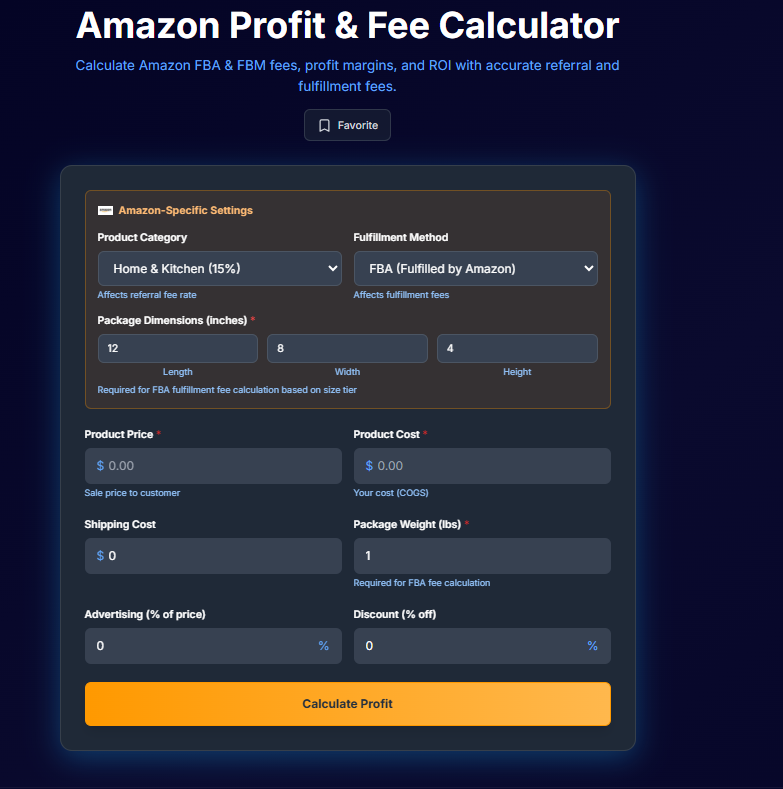
Go to: https://tools.quixess.com From the tools page, select Amazon Profit Calculator.
From the tools page, select Amazon Profit Calculator.
Pro Tip: Hover over each platform to see specific requirements and limitations before connecting.
Select Your Amazon Product Category
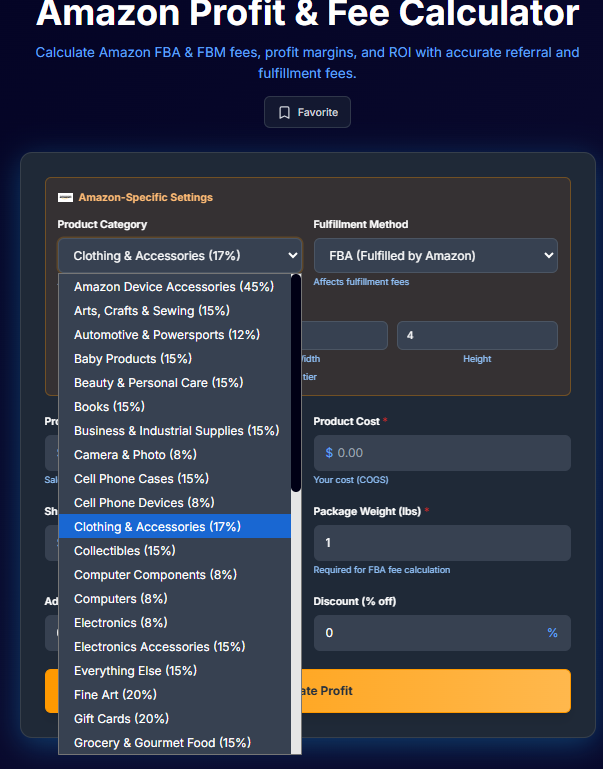
Choose the category that best matches your product.
Each Amazon category has a different referral fee percentage,
Selecting the correct one is critical for accurate profit calculation.
For example: Clothing & Accessories ≈ 17% Electronics ≈ lower Home, Beauty, and others vary
The calculator automatically applies the category referral fee once selected.
Security Note: We use OAuth 2.0 for secure authentication. Your Shopify credentials are never stored on our servers.
Choose Your Fulfillment Method
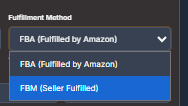
Select how the product is fulfilled:
FBA (Fulfilled by Amazon) Amazon handles storage, picking, packing, shipping, and customer service. Additional fees apply.
FBM (Fulfilled by Merchant) You handle shipping and fulfillment yourself. Amazon fulfillment fees are not applied.
For this example, selecting FBM assumes you manage shipping independently.
Pro Tip: Hover over each platform to see specific requirements and limitations before connecting.
Enter Product Pricing and Costs
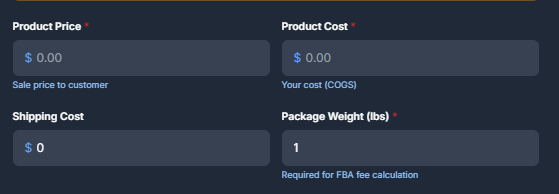
Enter the core numbers required to calculate profit:
Amazon Selling Price – what the customer pays
Shipping Cost – your outbound shipping expense
These three values form the base of the profit calculation.
Initial sync may take a few minutes for larger stores. You'll receive a notification when complete.
Add Advertising or Promotion Costs (If Applicable)

If you run Amazon ads or external promotions, enter the cost as a percentage of the selling price.
If you are not running ads or discounts, leave these fields empty or set them to zero.
Even small ad percentages can significantly impact Amazon profit.
Pro Tip: Hover over each platform to see specific requirements and limitations before connecting.
Calculate Amazon Profit

Click Calculate Profit to generate your results.
The calculator will instantly show: Net profit or loss , Profit margin and a full cost breakdown
Security Note: We use OAuth 2.0 for secure authentication. Your Shopify credentials are never stored on our servers.
Review the Profit Breakdown
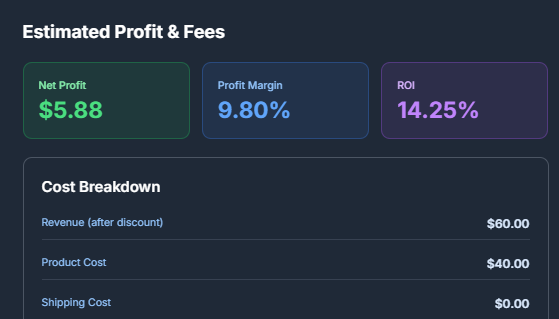
Scroll down to view how each cost contributes to your final Amazon profit
This includes: Amazon referral fees and Fulfillment fees (if FBA is selected), Shipping , Advertising Other applicable costs
This breakdown helps you identify exactly where margins are being lost.
Option A: Set to 0% for clean reporting. Option B: Add a small fee to cover Shopify subscription costs.
Account for Amazon Subscription Fees

Amazon charges:
$39.99/month for Professional seller accounts
$0.99 per sale for Individual accounts
These fees are noted in the calculator but should also be considered when evaluating overall profitability, especially for low-margin products.
Pro Tip: Hover over each platform to see specific requirements and limitations before connecting.
Email the Profit Report (Optional)

You can choose to email the profit report to yourself for later reference.
This is useful when comparing multiple products or sharing results with a team member.
Pro Tip: Hover over each platform to see specific requirements and limitations before connecting.
When to Use This Calculator
Use the Quixess Amazon Profit Calculator:
- Before listing a new product
- Before running ads
- Before increasing inventory orders
- When evaluating supplier price changes
- When switching between FBA and FBM
Accurate Amazon profit calculation is essential before scaling.
Next Steps
If you want to assess whether your overall business setup supports sustainable growth, you can also run the Quixess Readiness Audit to identify operational gaps beyond profit alone.
Summary
Revenue does not equal profit. This calculator helps you see real Amazon profit by accounting for fees and costs that are easy to overlook.
Use it consistently to make pricing, sourcing, and scaling decisions with confidence.